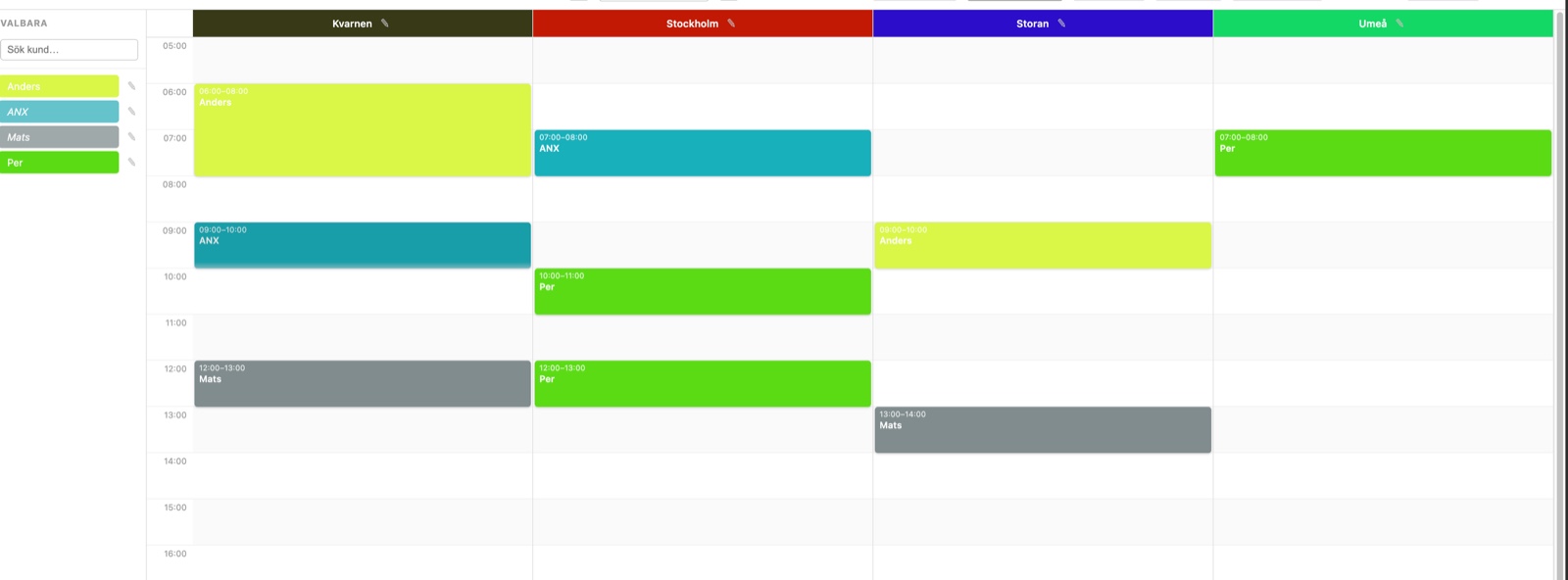
Real-time calendar view
All rooms displayed side by side with bookings as colour-coded blocks. Drag and drop to move or resize a booking without opening a dialog. Get started immediately — no training required.
A clear calendar view for meeting rooms, conference rooms and shared spaces — with access control and a complete booking workflow. Up and running in one day.
Roombook is a web-based room booking system built for organisations that share meeting rooms, spaces and resources between users and teams. See which industries it fits.
All rooms displayed side by side with bookings as colour-coded blocks. Drag and drop to move or resize a booking without opening a dialog. Get started immediately — no training required.
Create daily or weekly recurring bookings with one click. Edit individual occurrences or the entire series. Series are visually marked in the calendar so everyone sees them at a glance.
Admin controls which rooms and resources each user can book. Personal customer accounts allow private bookings visible only to that user. Read more about permissions in the FAQ.
Configure specific users to require admin approval. Pending bookings are clearly marked and admin is notified by email. Ideal for healthcare, education and sensitive resources.
Every change is logged with a before/after snapshot. Deleted bookings can be restored directly from the log. Filter by event type and time period for full traceability.
A read-only view that updates automatically every 30 seconds. Open it in a browser on any screen — a TV, tablet or monitor mounted outside the room — no login required. Perfect for offices and facility management.
Integrated with Tapirx: for dedicated room displays outside every meeting room, Tapirx panel devices connect directly to Roombook through our open panel API — showing today's bookings and letting people book on the spot. Requires a Pro subscription.
Generate a unique QR code per room and print a sign to put up at the door. Visitors scan the code with their phone and book instantly — without going to a computer. Perfect for impromptu meetings and shared spaces.
Set a maximum number of seats on a room to allow parallel bookings up to the capacity limit. Multiple users can book the same time slot — the system counts booked seats and blocks when the room is full. Great for gyms, study rooms and open office areas.
Connect Roombook to your existing LDAP directory or Active Directory. Users log in with their regular credentials and LDAP groups can control which rooms each group can book — no manual permission setup in Roombook required.
We have designed out the complexity that makes other booking systems frustrating to deploy and administer.
Roombook is a web-based service. Users don't need to install anything — a browser bookmark is all it takes. We handle hosting, backups and updates. See how quickly you can get started.
Real-time conflict detection prevents two users from booking the same meeting room at the same time, even with simultaneous requests. The error is shown immediately — no booking goes through unless it is valid.
Add exactly the rooms you have, invite the users who need access and configure permissions individually. No overhead from unused modules — just what you actually use.
Roombook has an open panel API so physical room displays and external systems can fetch and create bookings in real time.
Tapirx makes sleek panel devices mounted outside meeting rooms and desks. They are fully integrated with Roombook — the panel shows today's bookings straight from your Roombook calendar and lets employees book the room on the spot with a single tap. No separate server, no double entry.
Requires a Pro subscription. The Tapirx integration and the panel API are available on Roombook Pro — not on the free plan.
Learn more about Tapirx →We handle all the setup — you just fill in your organisation and start booking. See all included features.
Send an email with your organisation's name. We set up an account with a unique login link and get back to you within 24 hours. Send an email now.
Log in as admin and add your rooms, create user accounts and set permissions. Takes typically 15–30 minutes. Guided setup directly in the service.
Share the login link with your colleagues. No registration or email verification — they log in directly with one click.
Drag and drop bookings in the calendar. Conflicts are caught automatically and the approval workflow kicks in when needed. No training required.
Roombook is used by organisations that need to coordinate shared spaces and resources. Get started in one day regardless of industry.

Book meeting rooms, conference rooms and quiet zones. Open the display screen in a browser on a TV or monitor mounted outside the room — no login, updates automatically.
Manage bookings for shared spaces in residential buildings — laundry rooms, gyms, common rooms. Easy for residents to book without contacting the property manager. Learn more.
Schedule classrooms, computer labs and halls. Access control per department and teacher prevents accidental double bookings of shared spaces.
Book hall time, changing rooms and meeting spaces. Clear overview for coaches and officials. Recurring bookings are ideal for regular training sessions.
Coordinate recording studios, editing suites, screening rooms and rehearsal spaces. Each room gets its own colour in the calendar view for easy overview.
Manage bookings of treatment rooms, consultations and equipment with an approval workflow for sensitive resources. Full audit log with traceability on every change.
Have a question not answered here? Get in touch and we'll answer.

Direct support by email — no phone queues and no bots. We handle all updates and outages without you needing to do anything.
Send an emailCreate a free account right now — 2 rooms included. Need more? Get in touch and we'll upgrade you.
Free up to 2 rooms · No lock-in · No installation